
Features
Everything BoardIt does
A booking board your members understand straight away, and management that stays simple for the court committee. Here is what is in the box.
For members
Booking a court takes seconds
Members log in with their email address and password and see every court at a glance.
Clear booking board
All courts side by side on a 15-minute grid, with date navigation. Free, booked and your own slots are easy to tell apart.
Drag to move
Drag a booking to another time or court on the same day. Playing time, players and opening hours are checked automatically.
Choose your playing partners
Search fellow members by name and add them to the booking, up to four players per court.
Email with calendar file
Every player gets an email for a booking, a move or a cancellation, with an .ics file and a Google Calendar button.
My bookings
With [boardit_my_reservations] members see their upcoming bookings and cancel them themselves.
On every screen, in 7 languages
Landscape or portrait view, also on a phone. Each member uses BoardIt in their own WordPress language.
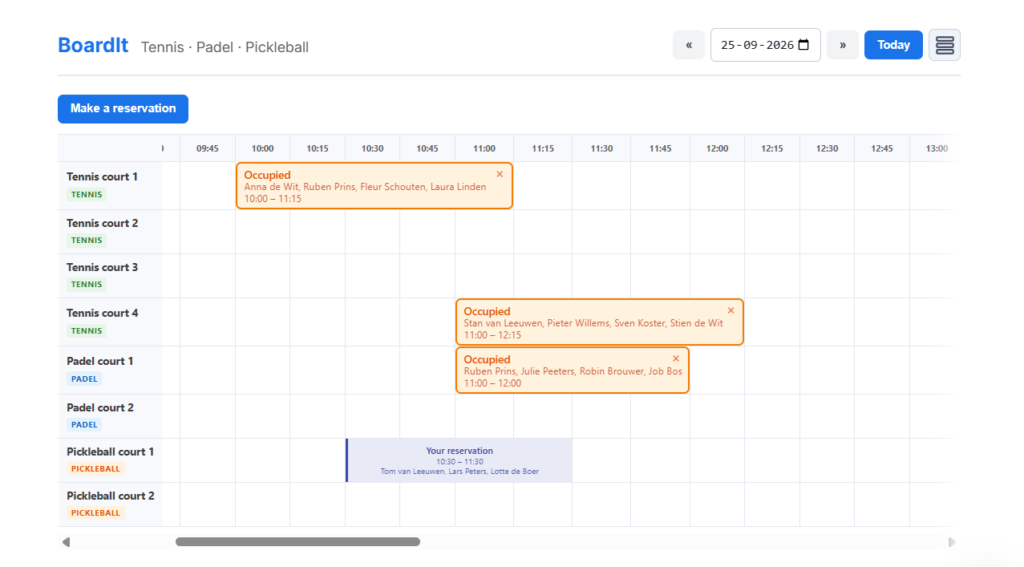
The board your members will use
The board refreshes itself, so everyone always sees the same bookings. Pick a free slot, add players, confirm.
- 15-minute grid with the times always in view
- Horizontal or vertical view
- Colours to match your club
- Bookings limited by days ahead and per member
For the court committee
Management right inside WordPress
No separate system, no extra logins. Everything is under BoardIt in your dashboard.
Courts per sport
Tennis (playing time depends on the number of players), padel (90 minutes) and pickleball (60 minutes). As many courts as you like.
Recurring bookings (Pro)
Reserve courts once or weekly for coaching, league matches, social tennis or maintenance.
Members
Overview with booking counts, search, block and unblock, and a maximum number of bookings per member.
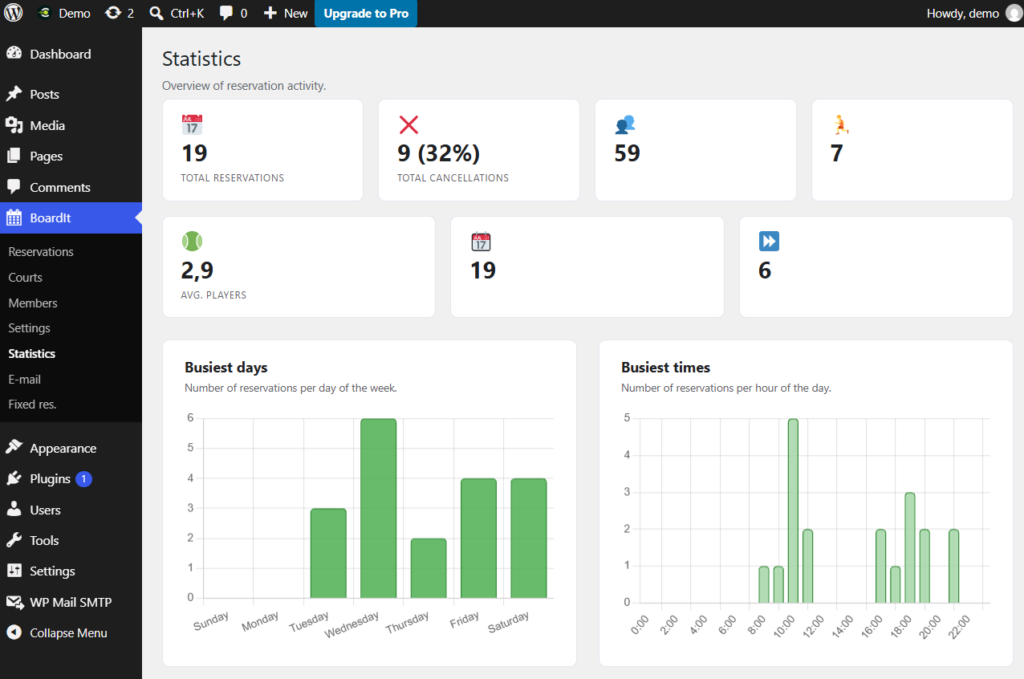
Statistics (Pro)
Busiest days and times, occupancy per court and the trend per month.
Editable emails
Sender, subjects and texts of every email are yours to change, in every language.
Roles and privacy
A court manager role for volunteers. Old bookings are anonymised automatically, and your data never leaves your site.
Know how your courts are used (Pro)
The statistics show when the courts are busiest and which courts are popular, so the committee can plan coaching and league play with confidence.
- Bookings per day of the week and per hour
- Occupancy per court
- Trend per month
Free and Pro
What is free, what is Pro
The free version is complete for most clubs. Pro adds fixed reservations, statistics and extras for guests and sponsors.
| Feature | Free | Pro |
|---|---|---|
| Booking board with unlimited courts | ✓ | ✓ |
| Tennis, padel and pickleball | ✓ | ✓ |
| Drag to move bookings | ✓ | ✓ |
| My bookings and cancelling | ✓ | ✓ |
| Emails with calendar file | ✓ | ✓ |
| Members, blocking and maximum per member | ✓ | ✓ |
| Court manager role | ✓ | ✓ |
| Board colours and 7 languages | ✓ | ✓ |
| Recurring bookings | — | ✓ |
| Statistics | — | ✓ |
| Guest players: up to 3 non-members per booking | — | ✓ |
| Names of all players visible on the board | — | ✓ |
| Sponsor logos at the bottom of every email | — | ✓ |
Try it on your own club site
Install the free version in a few minutes. Upgrade to Pro whenever your club is ready.